
Your Cart is Empty


Get a Personalized Quote×
Overview
|
 |
What's New
The latest ZBrush update provides enhancements that will help you explore new workflows, including the ability to create high quality renders with the integration of Redshift. From Hard Surface modeling and Character Creation to World Building and Environment Design, ZBrush provides you with access to diverse workflows and limitless creative possibilities with ease.
 |
 |
 |
 |
|
REDSHIFT IN ZBRUSH |
SLIME BRIDGE |
LOCAL SYMMETRY |
SCULPTRIS PRO UPDATE |
 |
 |
 |
 |
|
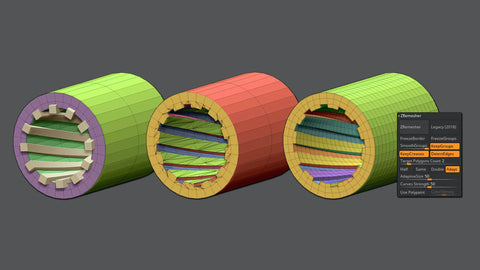
CREASE EDGE UV UNWRAP Use crease edges to dictate where UV seams will be placed. |
ZREMESHER RETRY / KEEP POLYPAINT ZBrush can convert its polygons into a usable base mesh with clean edge loops and polygon flow almost instantly. |
MASK REGION Allows for expanded use of ZBrush’s robust masking system so you can draw shapes on the surface of a mesh while filling those areas uniformly and independently. |
APPLY LAST ACTION (SUBTOOLS) Allows for application of material attributes, color information and any other “undoable” operations to multiple subtools with the click of a button. |
Highlights
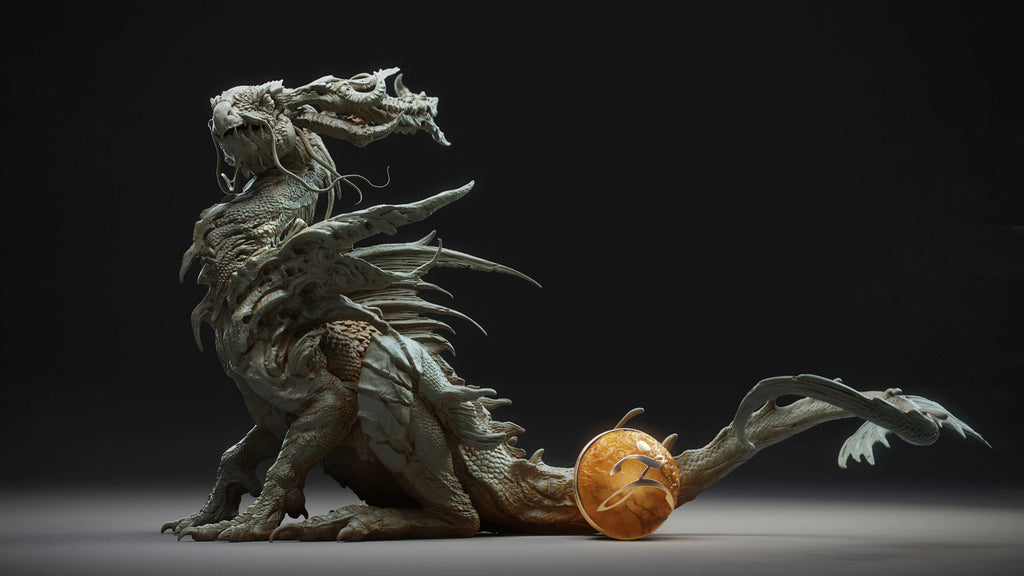 |
DIGITAL SCULPTING Get empowered by the world’s leading digital sculpting solution. The powerful systems inside of ZBrush are designed to eliminate the constraints of traditional modeling and allow you to create freely, just as you would with clay.
|
|
PAINTING & TEXTURING Because ZBrush works with tens of millions of polygons in real-time, you can paint directly on the surface of the model without first assigning a texture map or UV’s. This offers significant advantages compared to a standard workflow. The resolution of the texture map does not need to be decided in advance. You have the freedom to visualize, explore and create textures in 3D, and in real time.
|
 |
 |
READY, SET, RENDER Whether you are using ZBrush by itself as an illustration tool or as part of a production pipeline for animation, you will at some point want to show your work to others. ZBrush makes this possible using Redshift, as well as a powerful rendering system called BPR (Best Preview Render).
|
|
TOOLS PIPELINE The intuitive approach of ZBrush doesn’t end with sculpting and painting. Interoperability is at your fingertips, with support for key file formats and real time integration with a number of popular software packages.
|
 |
 |
COMMUNITY ZBrush is not just an application. You’ll be welcomed into one of the largest communities of artists gathered around any 3D software. From our active online community at ZBrushCentral, to our community events, ZBrushLIVE streams and online learning platforms - we believe in helping artists elevate one another.
|
|
REQUIREMENTS ZBrush is available in the following languages: English, German, Spanish, Korean, Chinese, French, Japanese |
 |
All Features
|
SCULPTING |
SCULPTING |
SCULPTING |
|
SCULPTING Polygon Modeling ZBrush’s capabilities are not limited to organic sculpting: You can also use it to intuitively create low poly hard surface models. |
SCULPTING |
SCULPTING |
|
PAINTING & TEXTURING |
PAINTING & TEXTURING |
PAINTING & TEXTURING |
|
PAINTING & TEXTURING |
RENDERING |
RENDERING |
|
RENDERING |
RENDERING |
RENDERING |
|
PIPELINE Universal Camera ZBrush’s universal camera is a physically accurate camera which can be imported from or exported to other 3D applications. |
PIPELINE Interoperability With the GoZ dynamic bridge, you can send your ZBrush model back and forth between supported applications with a single click. |
PIPELINE Supported Formats ZBrush supports various formats for the import and export of 3D geometry as well as most industry-standard image formats for texturing. |
Trial Download
ZBrush Free Trial Software Download
Download and test ZBrush before you make your purchasing decision.
Webinars
Latest ZBrush Webinars from Novedge
Discover What's New In ZBrush4R7
|
What it's about Join us, as Pixologic’s own Paul Gaboury takes on a tour through ZBrush . He will be covering all of the new exciting features, which include ZModeler, Array Mesh, NanoMesh and the ZBrush to Keyshot Bridge. He’s even going to share a couple other additional features of you may not have been aware of in ZBrush4R7. Who is presenting Paul Gaboury works for Pixologic helping to bring the next generation of sculpting software to the world. He has trained at nearly every major film and game company and has developed training programs for universities and educational institutions around the globe. Who should watch Any ZBrush user or anyone interested in adding ZBrush to their pipeline |
|
HW Suggestions
Recommended System Specification
NOVEDGE is an authorized HP reseller that offers a wide range of professional quality notebooks and workstations to meet your hardware needs.
In addition, NOVEDGE works with High Speed Computing to customize workstations to give you the perfect hardware for your design needs at a competitive price. Contact us to discuss pre-built and custom configuration workstations and laptops.
You can find our selection of high performance hardware products at this LINK.
Below you can try our free experimental AI Service, which makes computer hardware recommendations for selected design software products. Our goal is to make it as good as a first line support human person, and it can work for you 24/7. Please give us your feedback to help make this service as good as it can be.
If you need help with sales instead, we have an excellent human team that will be happy to help you find the products best fit your needs from our very large selection of standard and custom workstations and laptops. You can get in touch with them by email at sales@novedge.com or phone at 1-415-848-9018.
If you do not get a satisfactory answer try to rephrase the question in a more specific/detailed way
This service is a prototype and therefore it may return incorrect or incomplete answers. Furthermore, Artificial Intelligence is intrinsically prone to occasional mistakes, misunderstandings, and incomplete answers at least as much as human intelligence is.
This experimental service is offered as is and free of charge as a demonstration of the capabilities of Artificial Intelligence as an automated tool for support. Although the information found on this system has been produced and processed from sources believed to be reliable, no warranty, express or implied, is made regarding accuracy, adequacy, completeness, legality, reliability, or usefulness of any information.