
Your Cart is Empty


Get a Personalized Quote×
eDrawings Pro for PTC Creo is the first email enabled collaboration tool designed to ease the sharing and interpretation of 2D and 3D product design data. It is a plug-in for Creo that allows users to publish Pro/ENGINEER files as read only and ultra compact (up to 95% compression) eDrawings files for visualization, collaboration and design review.
View, publish and share exact read-only representations of Creo parts, assemblies and drawings (*.prt, *.asm, *.dwg) for design review and collaboration.
Features and benefits
 |
 |
|
Dynamic Cross-section View cross sections of part and assembly files by creating a variety of cross section planes. |
Measurement Use the Measure tool to measure exact dimensions in part, assembly, and drawing files. |
 |
 |
|
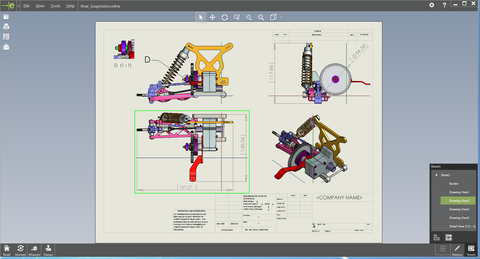
Simplified representations, Multiple Drawing Sheets support Export Simplified representations, Family table instances, Multiple Drawing Sheets to eDrawings. |
Mass Properties Query Mass, Volume, Density (parts only), and Surface area of the model. |
 |
 |
|
Move Components Move, show and hide components in an assembly file, or in a drawing file of an assembly. You can also move entire subassemblies. |
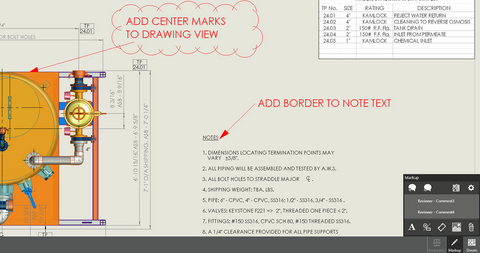
Markups Add markup elements, such as geometric elements, clouds, text, or dimensions to the comment using the markup tools. |
 |
 |
|
Batch Publish Convert multiple CAD files to eDrawings. |
3D data in Drawings Visualize drawings more effectively by exporting 3D shaded data in drawing files. |
 |
 |
|
Layouts Open individual views in a drawing and arrange them in any way you desire. eDrawings layouts also automatically align the views intelligently and enable the eDrawings recipient to print and export any subset of a drawing. |
Animation Demonstrate how drawing views relate to each other. With the click of a button eDrawings animates all the views contained in your drawing. Try out this feature yourself and see why everyone is so excited about eDrawings! |
 |
 |
|
Save as STL, Image formats eDrawings can be optionally exported by the eDrawings Viewer as STL files. |
3D Pointer Easily identify and match geometry in multiple views using the 3D Pointer. |
 |
 |
|
Insert Stamps Insert your company logos and images as stamps in the eDrawings file. |
Data Protection Password protect eDrawings, disable measurement and STL export to protect sensitive data |
 |
|
|
Explode Views Display exploded view information in assembly documents. |
Specs
Installation Requirements
In order to work properly, your copy of eDrawings Pro for PTC Creo requires:
|
|
|
|
OR |
|
 |
|
|
OR |
|
 |
|
|
OR |
|
 |
|
|
OR |
|
 |

HW Suggestions
Recommended System Specification
NOVEDGE is an authorized HP reseller that offers a wide range of professional quality notebooks and workstations to meet your hardware needs.
In addition, NOVEDGE works with High Speed Computing to customize workstations to give you the perfect hardware for your design needs at a competitive price. Contact us to discuss pre-built and custom configuration workstations and laptops.
You can find our selection of high performance hardware products at this LINK.
Below you can try our free experimental AI Service, which makes computer hardware recommendations for selected design software products. Our goal is to make it as good as a first line support human person, and it can work for you 24/7. Please give us your feedback to help make this service as good as it can be.
If you need help with sales instead, we have an excellent human team that will be happy to help you find the products best fit your needs from our very large selection of standard and custom workstations and laptops. You can get in touch with them by email at sales@novedge.com or phone at 1-415-848-9018.
If you do not get a satisfactory answer try to rephrase the question in a more specific/detailed way
This service is a prototype and therefore it may return incorrect or incomplete answers. Furthermore, Artificial Intelligence is intrinsically prone to occasional mistakes, misunderstandings, and incomplete answers at least as much as human intelligence is.
This experimental service is offered as is and free of charge as a demonstration of the capabilities of Artificial Intelligence as an automated tool for support. Although the information found on this system has been produced and processed from sources believed to be reliable, no warranty, express or implied, is made regarding accuracy, adequacy, completeness, legality, reliability, or usefulness of any information.
