
Your Cart is Empty


Get a Personalized Quote×
Power NURBS Pro for 3ds Max unique hybrid approach fuses the next generation NURBS surface construction technology with the industry’s leading Solids Modeling technology bringing an unparalleled modeling experience to the 3ds Max Platform.
Power NURBS modeling environment is designed to provide artists intuitive access to complex advanced modeling tools allowing you to expand your creative potential beyond the polygon world.
- Quickly sketch out your idea with our free form NURBS curve network.
- Easily blend or sweep your curves into complex interconnected organic shapes.
- Intuitively re-sculpt your form on the fly while changes automatically propagate through your model.
- Produce complex surface detail by drawing and projecting curves onto your model.
- Cutaway, intersect, join or Boolean surfaces and solids without having to clean up polygon errors.
- Feel the joy of selecting any edge or set of edges and applying numerous fillet combinations that work and with our resolution independent meshing technology.
- Never worry about poly count again.
- Sound too good to be true? Think again. It’s all here in Power NURBS, so stop imagining and truly experience the next generation of modeling.
Features
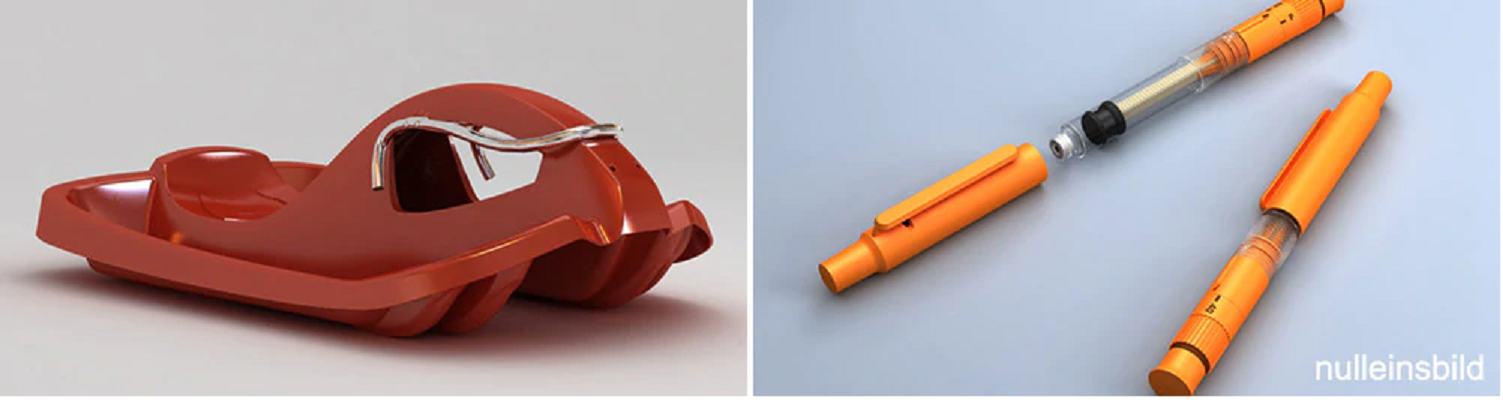
Power NURBS Pro for 3ds Max contains all of the functionality of Power Solids and Power Translators plus a lot more.
- Powerful Artist Oriented User Interface - for fast, flexible construction and editing.
- Intelligent NURBS Sketcher- easily sketch, draw or trace complex NURBS curve networks.
- Power Trim - trimming and splitting with projected curves and surface. See Video. Also added were powerful offset, step back and filling tools to enable the user to quickly and easily create complex surface features.
- Solid Boolean features - Join, intersect, merge, subtract and trim complex combinations of surfaces and solids without polygon artifacts.
- Power Blend - double sided blend and moving much of the common operations into the right click menu. See Video. "Side Blending" to enable users to create blends with 3 and 4 tangent sides.
- Advanced surface and Solids Filleting - Round any edge or edges with numerous fillet types and any combination of radii.
- Power X Curve - the ability to produce an intersection curve between 2 surfaces.
- Intelligent objects - retain parameterization and includes full, navigatable, per-object history.
- Resolution independent surfaces - easily adjust a model’s level of detail for the viewport or rendering.
- Power Composite Sketch - the composite sketch can be used to reference curves in sketches as well as edges of surfaces. You can also split a composite sketch now.
- Power Sketch - tangent and perpendicular constraints for NURBS curves and surfaces. "Fix Curves" button which does automatic vertex merging setting tangency between curves. See Video. Also, right click menu items for common operations.
- Power Bevel - create bevels of various shapes around the edges of a surface to help them to render more realistically.
- Power 2-D Boolean - does 2-D Boolean operations between closed sketches.
- Power Surface Tools - provides surface draping and re approximation.
- Power Blend Curve - creates a 3-D blending curve between surfaces or edges. It updates when underlying curve/surfaces change.
- Power Project - creates a curve which represents the projection of a curve onto a surface or surfaces. It updates when underlying curve or surfaces change.
- Power Offset- creates offsets for the surfaces of a given object.
- Creation of Surface Grids - creation of a grid on the surface which represents the ISO curves displayed on the surface. This allows drawing on a surface with vertex and curve snapping.
- UV Trimming Sub-Object - sub-object mode to allow the user to dynamically adjust the default UV trimming curves of Rail Sweep, Blend, and Corner Blend surfaces.
Specs
Installation Requirements
In order to work properly, this product requires:
|
|
Autodesk |

HW Suggestions
Recommended System Specification
NOVEDGE is an authorized HP reseller that offers a wide range of professional quality notebooks and workstations to meet your hardware needs.
In addition, NOVEDGE works with High Speed Computing to customize workstations to give you the perfect hardware for your design needs at a competitive price. Contact us to discuss pre-built and custom configuration workstations and laptops.
You can find our selection of high performance hardware products at this LINK.
Below you can try our free experimental AI Service, which makes computer hardware recommendations for selected design software products. Our goal is to make it as good as a first line support human person, and it can work for you 24/7. Please give us your feedback to help make this service as good as it can be.
If you need help with sales instead, we have an excellent human team that will be happy to help you find the products best fit your needs from our very large selection of standard and custom workstations and laptops. You can get in touch with them by email at sales@novedge.com or phone at 1-415-848-9018.
If you do not get a satisfactory answer try to rephrase the question in a more specific/detailed way
This service is a prototype and therefore it may return incorrect or incomplete answers. Furthermore, Artificial Intelligence is intrinsically prone to occasional mistakes, misunderstandings, and incomplete answers at least as much as human intelligence is.
This experimental service is offered as is and free of charge as a demonstration of the capabilities of Artificial Intelligence as an automated tool for support. Although the information found on this system has been produced and processed from sources believed to be reliable, no warranty, express or implied, is made regarding accuracy, adequacy, completeness, legality, reliability, or usefulness of any information.